
Marine Electronics Guide
Modern Yacht Chartplotter & Electronics Systems
Modern chartplotters and multi-function displays are no longer simple GPS screens. Today’s marine displays can act as the central interface for navigation, sonar, radar, AIS, engine data, monitoring, networking, cameras, sensors, and onboard system integration.
Use this page with the infographic below to understand how modern yacht electronics connect, what a chartplotter can display, and how sensors, networks, antennas, and onboard systems work together at the helm.
System Diagram
Modern Yacht Electronics Layout
The diagram shows how a modern chartplotter or MFD can connect to the helm display, radar, AIS, VHF radio, GPS antenna, NMEA 2000 backbone, Ethernet network, sonar module, transducer, engine gateway, autopilot system, cameras, battery monitoring, tank sensors, and remote-access features.
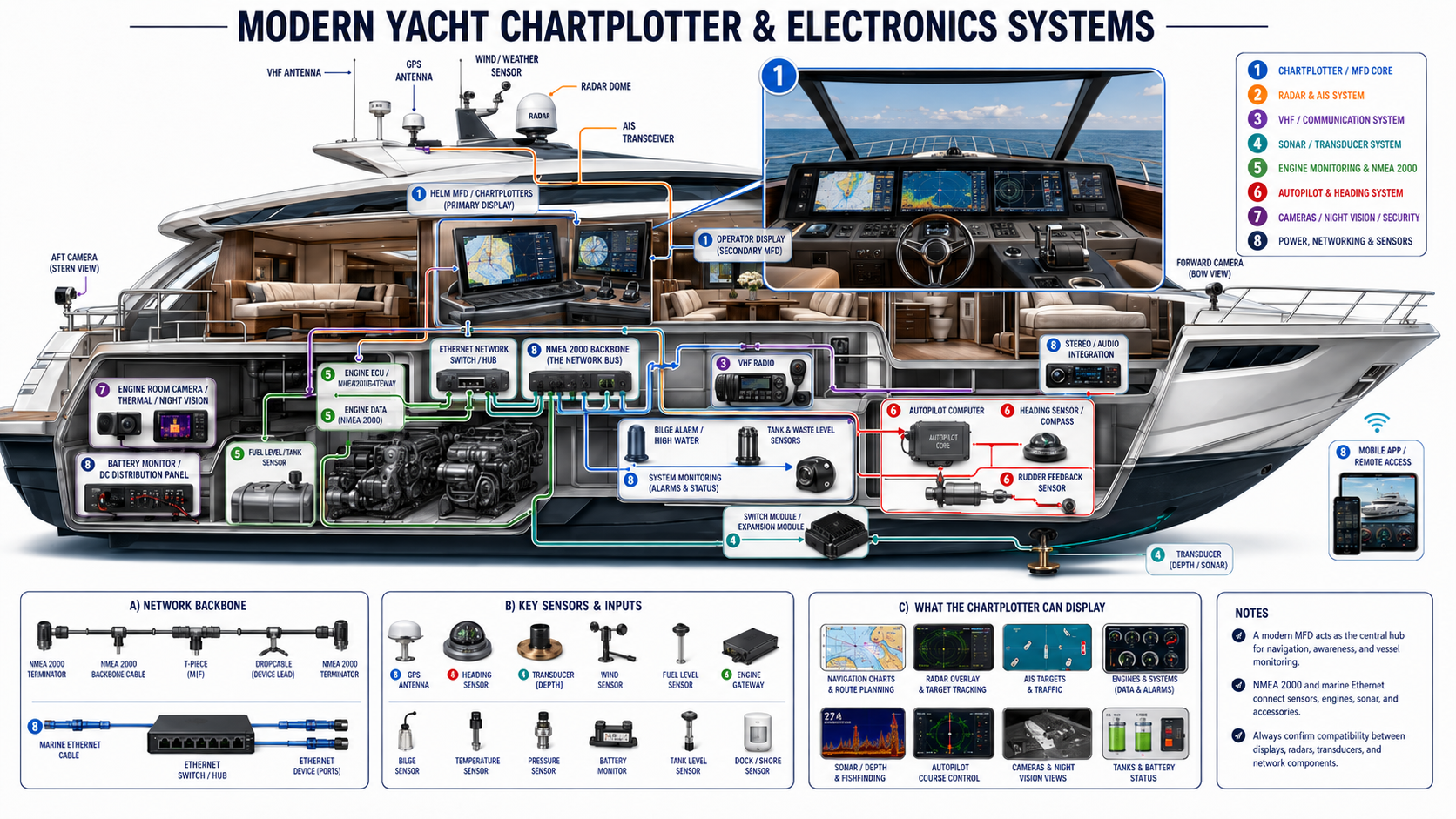
On mobile, swipe the diagram left or right to view the full electronics system layout.
How To Use This Page
Match Each Electronics System to the Correct Products
Marine electronics parts are not interchangeable just because they connect to a display. A radar dome, AIS transceiver, VHF radio, sonar module, NMEA 2000 sensor, Ethernet accessory, engine gateway, and autopilot component all have different compatibility requirements.
Use the system sections below to match the area in the diagram to the right product group. Always confirm compatibility between your display brand, radar, transducer, network backbone, engine interface, and existing onboard equipment before ordering.
System Breakdown
Modern Yacht Electronics Systems
Each color-coded system below matches the infographic and links to matching collections or safe site search pages.
Chartplotter / MFD Core
The chartplotter or multi-function display is the central interface for navigation, charting, system awareness, and connected onboard electronics.
- Primary helm MFD
- Secondary or repeater display
- Digital charts and route planning
- Radar, AIS, sonar, and engine-data display
- Networked helm integration
Radar & AIS System
Radar and AIS improve awareness around the vessel by showing nearby targets, traffic, obstacles, and vessel information on compatible displays.
- Radar dome or open-array radar
- AIS transceiver
- AIS target display
- Radar overlay on charts
- Collision-awareness support
VHF / Communication System
VHF radios and communication equipment support routine communication, safety calls, marina contact, bridge communication, and emergency readiness.
- Fixed-mount VHF radio
- Handheld VHF options
- VHF antenna
- DSC calling where supported
- Communication accessories and mounts
Sonar / Transducer System
The sonar and transducer system sends underwater depth, bottom, fishfinding, and structure data to a compatible display or sonar module.
- Transom-mount transducers
- Thru-hull and in-hull transducers
- CHIRP sonar
- Side and down imaging
- Depth and fishfinding views
Engine Monitoring & NMEA 2000
Engine gateways and NMEA 2000 networks can bring engine speed, fuel burn, temperature, pressure, alarms, and other vessel data into the chartplotter.
- Engine ECU or gateway
- RPM and temperature data
- Fuel-flow and fuel-level information
- Engine alarms and warnings
- NMEA 2000 backbone connection
Autopilot & Heading System
Autopilot systems use heading sensors, control computers, rudder feedback, and steering components to assist with course control on compatible boats.
- Autopilot computer
- Heading sensor or compass
- Rudder feedback sensor
- Course-control integration
- Chartplotter route-following support where compatible
Cameras, Night Vision & Security
Cameras and night-vision equipment can help improve visibility around the vessel, monitor the engine room, and support docking or security awareness.
- Aft camera
- Forward camera
- Engine-room camera
- Thermal or night-vision camera
- Security and monitoring inputs
Power, Networking & Sensors
Power distribution, Ethernet, NMEA 2000, sensors, switches, and monitoring modules allow separate onboard systems to share data with the helm.
- Battery monitor
- DC distribution panel
- Ethernet switch or hub
- NMEA 2000 backbone
- Tank, bilge, temperature, pressure, and shore-power sensors
Planning Rule
Build Around One Main Electronics Ecosystem
For most boats, the cleanest setup is to choose one primary electronics ecosystem for the main displays, radar, sonar, and core navigation equipment. This helps reduce compatibility issues and makes the system easier to install, update, expand, and service.
Other devices can often be added through NMEA 2000, Ethernet, gateways, or brand-approved interfaces, but the main helm experience should be planned around a clear system architecture.
Brand Selection
Choosing a Marine Electronics Brand
The best brand depends on your boat, your current equipment, your budget, and how advanced you want the system to be. Some boaters need a simple chartplotter for navigation. Others need a fully networked helm with multiple displays, radar, sonar, engine data, cameras, and automation.
Garmin
A strong choice for intuitive operation, broad integration, sonar, radar, charting, and full-system helm builds.
Best for: simple-to-use systems, fishing, cruising, and advanced integrated helms.
Simrad / B&G
Popular for offshore navigation, performance sailing, advanced control features, and larger integrated systems.
Best for: offshore boats, sailing, performance navigation, and advanced networked systems.
Raymarine
Known for strong radar options, thermal camera integration, clean display layouts, and capable cruising systems.
Best for: cruisers, radar-focused helms, and users who want a polished interface.
Lowrance
A strong value option, especially for fishing-focused boats and smaller vessels that need capable features without a full premium system.
Best for: smaller boats, fishing boats, and value-focused upgrades.
Humminbird
Often chosen for freshwater and fishing applications, especially where fishfinding and sonar imaging are the main priorities.
Best for: fishing-focused setups and sonar-heavy applications.
Mixed Systems
Mixed-brand systems can work, but they require more planning. Compatibility depends on the equipment, network type, software, sensors, and gateways used.
Best for: upgrades where some existing equipment is being reused.
Networks
Understanding Marine Networks
A modern marine electronics system works because the right devices are connected through the right networks. The display is only one part of the system. Sensors, modules, gateways, antennas, radar, sonar, and engine interfaces all need a proper communication path.
NMEA 2000
NMEA 2000 is the common marine data backbone used for sensors and monitoring. It is often used for engine data, fuel data, tank levels, heading sensors, GPS antennas, and other low-bandwidth information.
Search NMEA 2000 NetworkingEthernet & Marine Networking
Ethernet is used for higher-bandwidth equipment such as radar, sonar modules, cameras, and multi-display syncing. Marine Ethernet connections are often brand-specific.
Shop Networked Marine ElectronicsGateways & Interfaces
Gateways allow certain engines, sensors, digital switching systems, or older equipment to communicate with modern displays. Compatibility should always be confirmed before purchase.
Search Gateways & InterfacesBuying Help
How to Choose the Right Chartplotter or MFD
1. Start With Display Size
Smaller displays are easier to fit on compact helms and are ideal for basic navigation. Larger displays are better for split-screen views with charts, radar, sonar, and engine data shown at the same time.
2. Confirm Chart Coverage
Some units include chart data, while others require separate chart cards or downloads. Always confirm that the chart region matches where you boat.
3. Check Existing Equipment
Before choosing a display, identify your current radar, transducer, autopilot, engine network, AIS, and NMEA 2000 equipment. Compatibility can vary by brand and model.
4. Plan for Future Expansion
If you may add radar, additional displays, cameras, AIS, autopilot, digital switching, or more sensors later, choose a system with enough network capacity and expansion options.
Product Categories
Shop Marine Navigation & Electronics
Browse core navigation, electronics, monitoring, networking, and system components for building or upgrading a modern marine helm.
Final Takeaway
A good marine electronics system is not about buying the largest screen or the most expensive display. It is about building a clean, compatible system that matches how you use your boat.
The best setup should make navigation easier, improve safety, simplify monitoring, and leave room for future upgrades without forcing you to replace everything later.